Why Is Integration the Hidden Deployment Requirement in Physical AI?
The picking robot achieved 98% accuracy in testing. The manipulation was smooth, the object recognition precise. Everyone was ready to deploy. Then someone asked: "How does it know which items to pick?"
The answer revealed the problem. The robot needed to receive pick lists from the warehouse management system. It needed to report completions back. It needed to coordinate with conveyors. It needed to share floor space with other robots. It needed to log events for compliance. The intelligence worked. The integration didn't exist.
This is the integration problem in Physical AI: systems built to perform tasks in isolation must operate within complex enterprise environments where everything connects to everything else. A robot that picks perfectly but can't receive instructions is functionally useless. Integration isn't a nice-to-have — it's a deployment requirement.
Key Takeaways
- Integration consumes 40-60% of Physical AI deployment time and budget—far exceeding the effort required for the AI models themselves—yet is systematically underestimated because it's invisible in research demos and vendor proofs-of-concept.
- Physical AI must integrate across four critical dimensions: Upstream (task assignment from WMS/MES/ERP), Peer (coordination with robots and equipment), Downstream (reporting to inventory/quality/compliance), and Infrastructure (monitoring, maintenance, security).
- Traditional automation integration approaches fail for Physical AI due to real-time requirements (millisecond decisions), semantic gaps (physical vs. enterprise abstractions), uncertainty handling (probabilistic vs. deterministic), and state synchronization (physical reality vs. digital records).
- CDOs and Analytics Leaders face a data architecture challenge: Physical AI integration requires unified data pipelines across enterprise systems, real-time event streams, semantic mapping layers, and exception workflows—fundamentally different from batch ETL or traditional system integration.
- Integration capability is a platform requirement, not a deployment add-on—platforms lacking pre-built adapters, semantic mapping, exception workflows, and state synchronization remain research projects, not deployable systems.
- Before deployment, run an integration readiness assessment: Inventory all touchpoints (WMS, MES, ERP, AGVs, compliance systems), assess data flows and timing requirements, identify gaps, and allocate 40-60% of project resources to integration work.
What is the integration problem in Physical AI?
Physical AI systems often work in isolation, but fail in production because they can’t connect to enterprise workflows and systems.
Why Is Integration the Hidden Challenge in Physical AI Deployments?
Research systems exist in isolation by design. The goal is to evaluate capabilities, not operational integration. This creates blind spots:
Research Environments
-
Tasks are manually specified
-
Results are manually recorded
-
Timing is flexible
-
The system is the entire focus
Production Environments
-
Tasks come from upstream systems
-
Results must flow to downstream systems
-
Timing is constrained by larger workflows
-
The system is one component among many
The integration work is often underestimated because it's invisible in research. There's no benchmark for "connects to SAP." There's no accuracy metric for "coordinates with existing AGV fleet." Yet integration typically consumes 40-60% of deployment time and budget — far more than the AI itself.
What are the main challenges in integrating Physical AI systems?
The main challenges include real-time requirements, semantic gaps between physical and enterprise systems, handling uncertainty, state synchronization, and multi-vendor complexity. Addressing these requires event-driven architectures, semantic mapping, exception workflows, and more.
What Does the Integration Landscape Look Like for Physical AI?
Physical AI systems must integrate across multiple dimensions:
1. Upstream Integration: Task Assignment
Where do tasks come from?
-
Warehouse Management Systems (WMS): Pick lists, priorities, location assignments, and inventory data
-
Manufacturing Execution Systems (MES): Production schedules, quality specifications, process parameters
-
Enterprise Resource Planning (ERP): Order information, customer requirements, business rules
-
Custom Systems: Proprietary scheduling, legacy databases, manual overrides
Each system has its own data formats, APIs, timing requirements, and quirks.
Business outcome: Upstream integration enables Physical AI to operate as part of enterprise workflows rather than as standalone experiments.
2. Peer Integration: Coordination
What else operates in the same space?
-
Other Robots: Fleet management, task allocation, load balancing, collision avoidance
-
Material Handling Equipment: Conveyors, automated storage and retrieval, packaging equipment
-
Human Workers: Shared workspaces, exception handling
Coordination requires real-time communication, shared state, and conflict resolution.
Business outcome: Downstream integration enables real-time inventory accuracy, automated compliance documentation, and operational analytics that drive continuous improvement.
3. Downstream Integration: Reporting
Where do results go?
-
Inventory Systems: Stock updates, location changes, discrepancy reporting
-
Quality Systems: Inspection results, defect tracking, compliance records
-
Analytics Platforms: Performance metrics, utilization data, trend analysis
-
Compliance Systems: Audit logs, traceability records, regulatory reporting
Each downstream system expects data in specific formats at specific times.
4. Infrastructure Integration: Operations
What supports the system's operation?
-
Monitoring and Alerting: System health dashboards, failure notifications, performance tracking
-
Maintenance Systems: Service scheduling, parts management, work orders
-
Security Infrastructure: Authentication, authorization, network segmentation, data protection
Operational integration enables the system to be managed as part of facility operations.
Business outcome: Infrastructure integration enables Physical AI to be managed by existing operations teams rather than requiring dedicated AI specialists on-call 24/7.
How does Physical AI integrate with existing systems in production?
Physical AI must integrate with upstream systems like WMS, MES, ERP, and downstream systems like inventory and compliance systems. It also requires coordination with other robots and equipment in the environment to ensure smooth operation.
What Integration Challenges Are Unique to Physical AI?
Physical AI introduces specific integration challenges beyond traditional automation:
-
Real-Time Requirements
Physical AI systems make decisions in milliseconds. Integration must keep pace.
Solution: Caching, event-driven architectures, and graceful handling of delays. -
Semantic Gaps
Physical AI systems understand the world differently from enterprise systems.
Solution: Semantic mapping layers that translate between enterprise abstractions and physical reality. -
Uncertainty and Exceptions
Physical AI systems operate with uncertainty. Enterprise systems expect deterministic outcomes.
Solution: Exception workflows, confidence thresholds, and escalation paths. -
State Synchronization
Physical reality and digital records can diverge.
Solution: Reconciliation mechanisms, audit capabilities, and recovery procedures. -
Multi-Vendor Environments
Production facilities use equipment from multiple vendors.
Solution: Standards-based integration where possible, custom adapters where necessary.

What Integration Architecture Is Required for Physical AI to Work in Production?
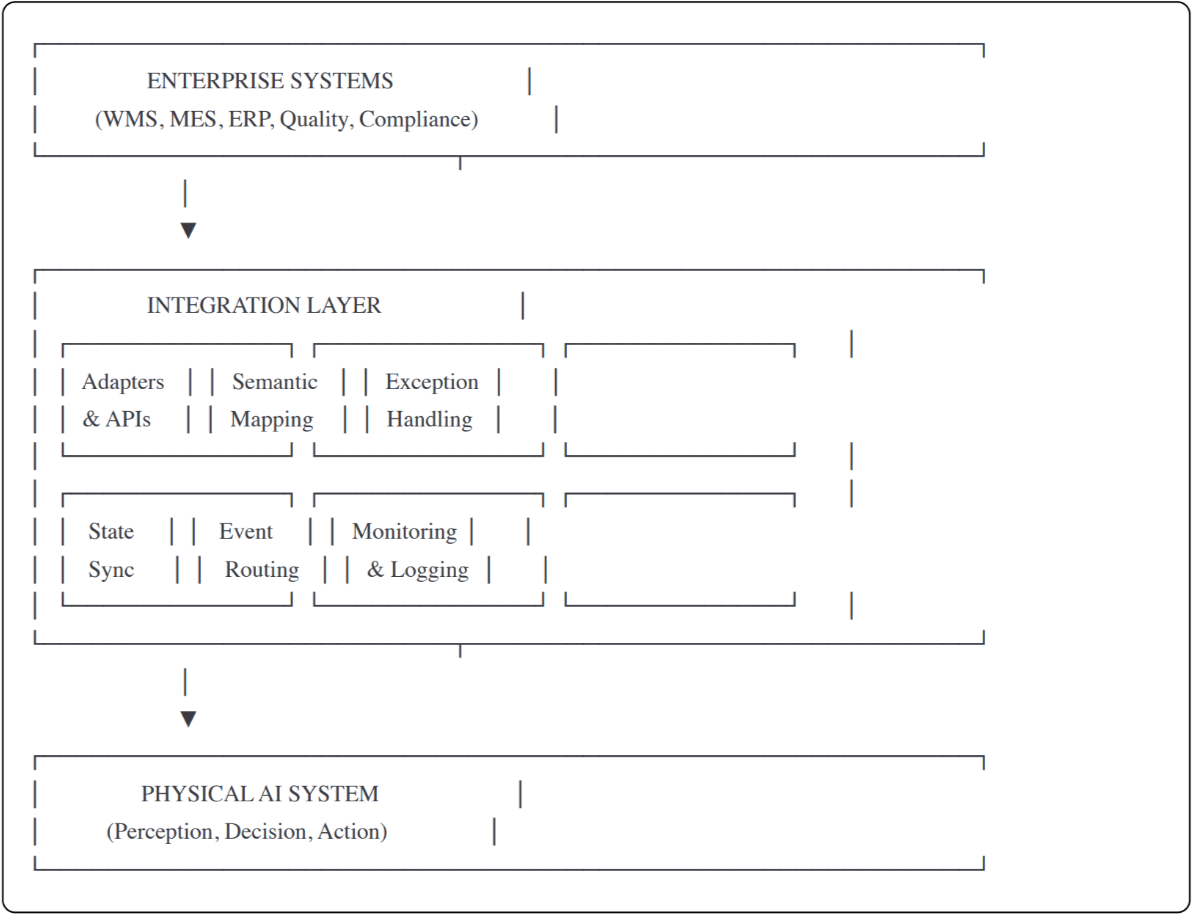
Successful Physical AI integration requires a deliberate architecture:
Layer 1: Integration Layer
-
Adapters and APIs: Pre-built connectors to common systems (SAP, Oracle, etc.), standard protocols (REST, MQTT, OPC UA), custom adapter framework for legacy systems
-
Semantic Mapping: Translation between enterprise and physical representations
-
Exception Handling: Confidence thresholds, escalation paths, retry logic, and fallbacks
-
State Synchronization: Reconciliation processes, event routing, conflict resolution
Layer 2: Event Routing
Real-time event distribution, Pub/Sub for multi-consumer scenarios, guaranteed delivery where required
Layer 3: Monitoring and Logging
Integration health monitoring, message tracing, and audit logging
What are the core building blocks of Physical AI integration architecture?
Integration layer, event routing, and monitoring/logging with traceability.
How Do You Run an Integration Readiness Assessment for Physical AI?
Before deploying Physical AI, map your integration landscape:
Step 1: Inventory All Touchpoints
| Category | System | Owner | Integration Method | Priority |
|---|---|---|---|---|
| Task source | WMS | Operations | API | Critical |
| Coordination | Existing AGVs | Automation | Proprietary | High |
| Reporting | Inventory DB | IT | Database | Critical |
| Monitoring | SCADA | Facilities | OPC UA | Medium |
| Compliance | Audit system | Quality | File export | Medium |
Step 2: Assess Each Integration
Data flows:
- What data must flow (structure, volume, frequency)?
- What transformations are required (semantic mapping complexity)?
- What's the latency requirement (real-time vs. batch acceptable)?
Technical feasibility:
- Does the system have APIs or requires custom development?
- What's the authentication/authorization model?
- What's the system's availability and reliability?
Step 3: Identify Gaps
Common integration gaps:
| Gap Type | Example | Impact | Mitigation |
|---|---|---|---|
| Custom development required | Legacy MES has no API | High cost, long timeline | Budget 3-6 months, allocate senior developers |
| Timing mismatch | Quality system only accepts batch uploads | Real-time compliance reporting blocked | Queue events, batch upload hourly, accept reporting lag |
| Data quality issues | Product dimensions missing in WMS | Semantic mapping impossible | Data remediation project before deployment |
| Organizational blockers | IT won't grant API access | Integration blocked | Executive escalation, security review |
Step 4: Plan Integration Work
-
Develop an integration testing environment, timeline, and resource requirements
What is the role of semantic mapping in Physical AI integration?
Semantic mapping ensures that the data and models used by physical systems can be accurately translated into enterprise systems and vice versa. This reduces errors and enhances system performance.
What Happens When Physical AI Integration Is Poor?
When integration is underestimated, projects fail in predictable ways:
-
Delayed deployment: Integration work takes 2-3x longer than planned.
-
Reduced functionality: Features are cut due to integration issues.
-
Operational friction: Manual workarounds add labor and errors.
-
Data quality issues: Synchronization problems compound over time.
-
Support burden: Integration issues dominate support requests.
The irony: the AI might work perfectly, but the project fails because it can't connect to anything.

What Must Physical AI Platforms Provide for Integration-Ready Deployment?
Integration capability is a platform requirement, not a deployment add-on:
| Capability | Why It Matters |
|---|---|
| Pre-built adapters | Reduce time to integrate with common systems |
| Standard protocols | Enable connection to diverse systems |
| Adapter framework | Support custom integrations for legacy systems |
| Semantic mapping | Translate between enterprise and physical models |
| Exception workflows | Handle uncertainty in deterministic environments |
| State management | Keep physical and digital reality synchronized |
| Integration monitoring | Detect and diagnose integration issues |
| Documentation and support | Enable successful integration projects |
Strategic insight for CDOs: When evaluating Physical AI vendors, integration capability is more important than AI accuracy. A system with 95% accuracy and robust integration delivers more value than a system with 99% accuracy that can't integrate.
Summary: Why Integration Determines Whether Physical AI Deploys or Stays a Demo
Integration is the hidden challenge in Physical AI deployment — often consuming 40-60% of project time and budget.
Physical AI must integrate across four dimensions:
-
Upstream: Task assignment from WMS/MES/ERP
-
Peer: Coordination with other robots and equipment
-
Downstream: Reporting to inventory, quality, and compliance
-
Infrastructure: Monitoring, maintenance, and security
Physical AI introduces specific integration challenges such as real-time requirements, semantic gaps, uncertainty, state synchronization, and multi-vendor complexity. Successful integration requires:
-
A dedicated integration architecture
-
Pre-built adapters and standard protocols
-
Semantic mapping and exception handling
-
State synchronization and monitoring
Before deploying, assess your integration landscape — inventory touchpoints, assess each integration, identify gaps, and plan work accordingly. A Physical AI system that works in isolation is a demo. A Physical AI system that integrates with your operations is a deployment.